Segno Player: play along on the original score, on any screen
October 25, 2026Segno Player (https://github.com/segnomusic/segno-player) is an open source web component that plays a MuseScore score's audio on its original engraved pages, with a marker on the bar being played and a cursor that follows the notes. This post covers why I built it, how it works and where it's heading.
Background
I have a hobby, or possibly a problem, of collecting sheet music for old public domain songs, mostly Swedish folk music and choral music. Some of it does get sung or played, and quite a lot of it doesn't. I do however intend to transcribe the works and publish them for public access on the web. I host the Swedish website frianoter.se where some have been published already.
To make the scores more accessible, I want them to be easy to view, play and download in any format. I'm very well aware of the immense library of digitalized sheet music on for example musescore.com. But I don't like how almost all interactions with the community-contributed scores are blocked by paywalls nowadays. The open source engraving software (musescore.org) is however still a brilliant piece of software, and if I were to guess it will remain the most popular engraving software in the general community and in non-commercial environments.
A number of years back I was using OpenSheetMusicDisplay (OSMD) for rendering MusicXML files (exported from MuseScore) in a couple of different side projects. It was, and seemingly still is, a really solid MusicXML rendering library. I also prototyped a very rough audio player for OSMD, and got to chat and work a little bit with the nice guys in the core team on an early version of the official audio player for OSMD. There are a few other notable OSS libraries in the space as well, for example Verovio.
To reflow or not to reflow
OSMD, Verovio and many similar sheet music renderers have quite advanced layout engines that allow them to dynamically engrave the sheet music depending on your available screen size. This is a truly great feature for music practice and education apps. But how successful these strategies are tends to depend a bit on the scores being rendered. Busy piano scores and choral works sometimes become a bit cluttered, and generally speaking intentional layout decisions get lost. It's a natural consequence and not really a flaw in the libraries, but for some scores it matters. Those are the cases where I think the built-in player on musescore.com, which preserves the full original layout, works better.
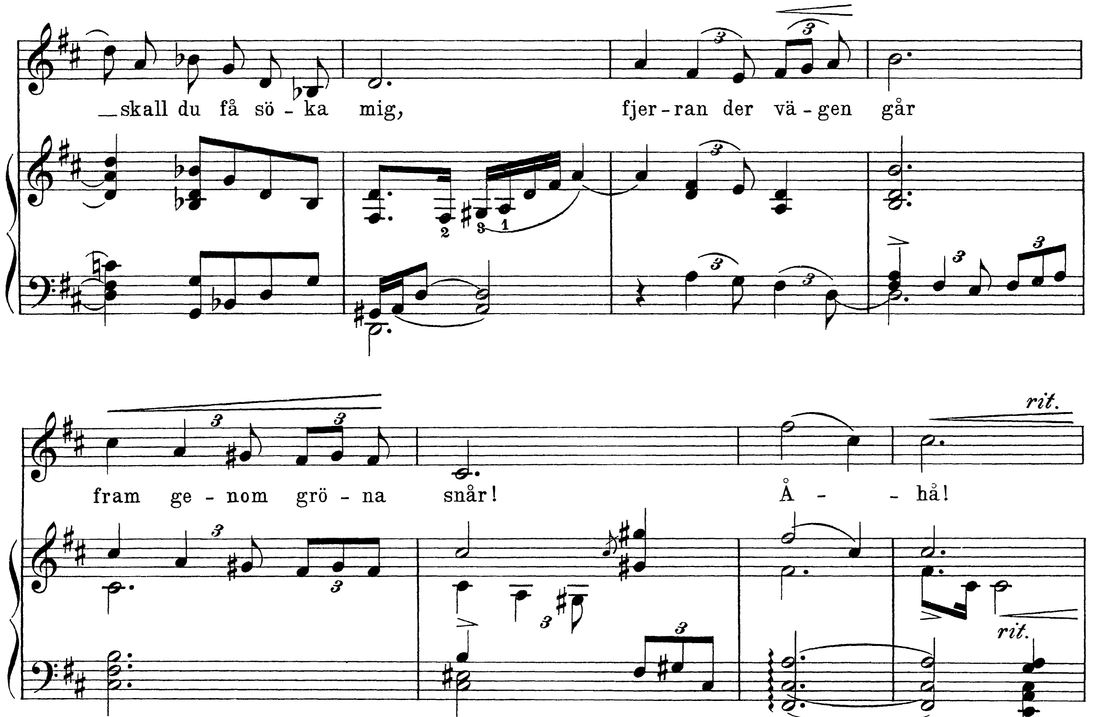
Here's an example. This is Helene Munktell's "Fjerran på enslig stig", a song for voice and piano from the Swedish Musical Heritage collection. It's nothing exotic, but it has the usual mix of triplets, hairpins, lyrics and a busy piano part. First the original print:
And here's the same passage (from my MusicXML transcription of the print) rendered with OSMD in a 390 px wide window, roughly a phone in portrait:
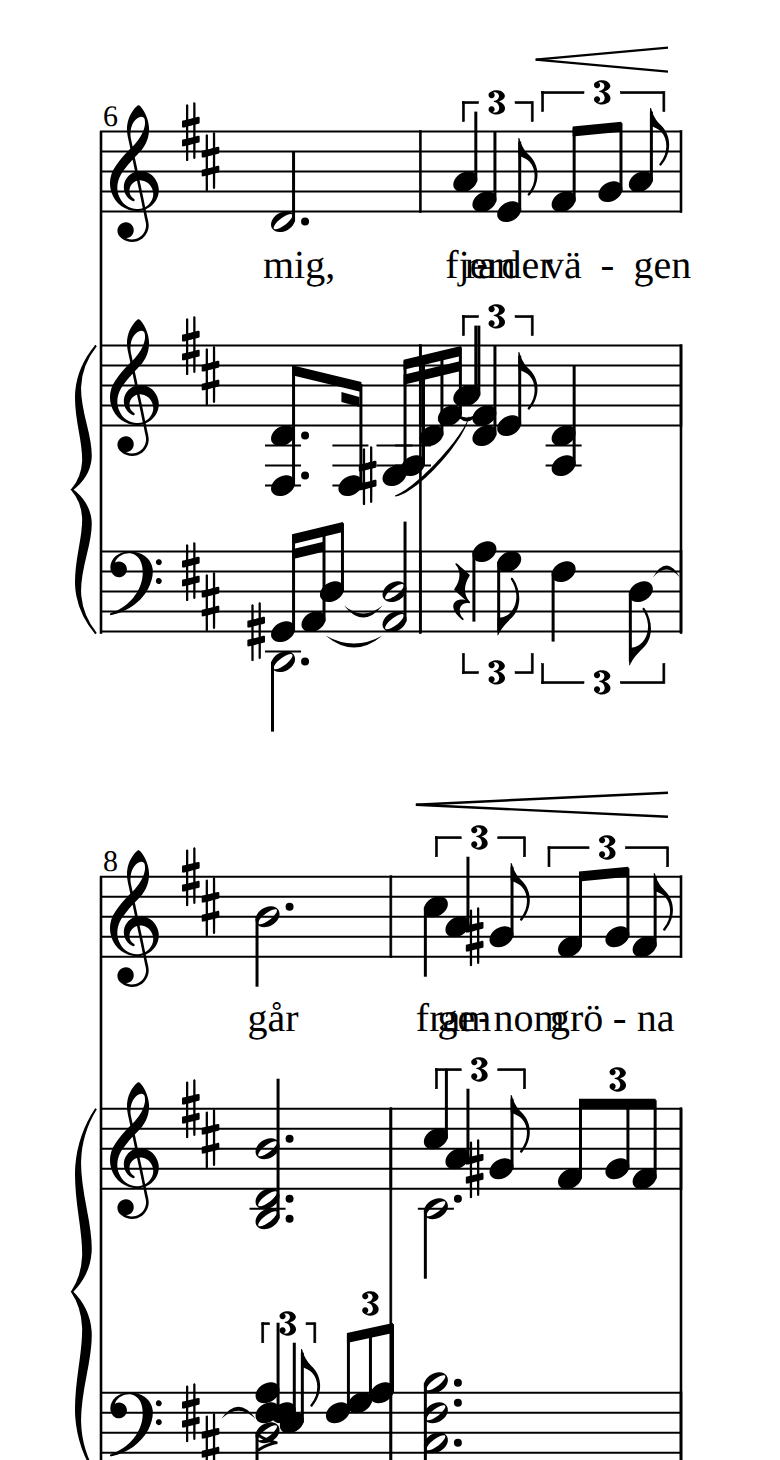
Everything is technically there, and the renderer is doing what it's supposed to do: squeezing the music into the width it was given. But "fjerran der vägen går" has turned into a smudge, and the same goes for "fram genom gröna" a few bars later. The tuplets are crammed together and the notes in the piano's right hand are practically sitting on top of each other. With a few more pixels to work with this would look just fine, and it's a trade-off I'm happy to accept in a practice app where you can zoom and scroll. But it's not what the engraver intended the music to look like.
Introducing Segno Player, the ambivalent sheet music audio player
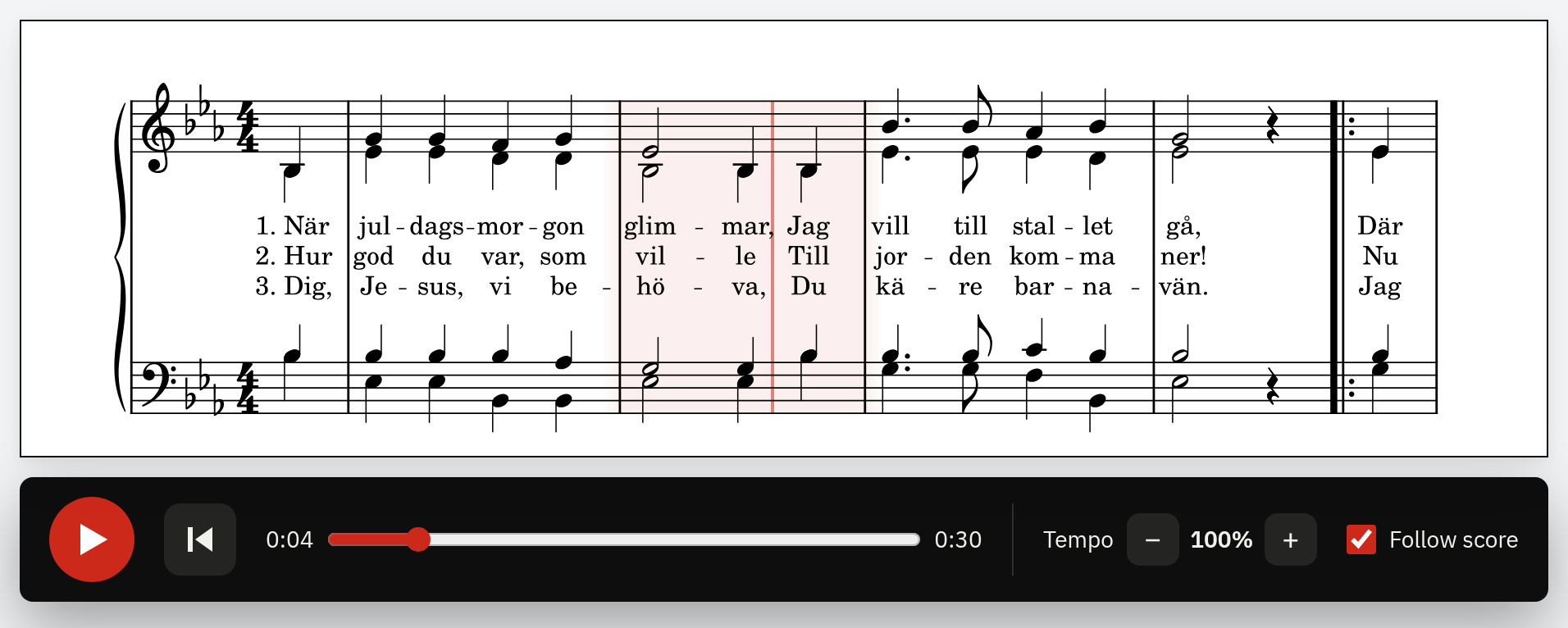
At its core, Segno Player is a layout-respecting sheet music player, allowing interactive playback of digital sheet music based on the original engraving. You press play, the audio starts, and a marker follows the current bar while a thin cursor flows from note to note. You can also click any bar to start playing from there.
And this is the real thing, so go ahead and press play:

Engraving of När juldagsmorgon glimmar by Fria Noter, CC BY 4.0.
The reason I'm accusing my Segno Player of being ambivalent is that it does offer some hybrid rendering modes that are meant to make scores more accessible on smaller screens. It offers these two additional display modes:
Zoom - Renders two vertical systems and a few bars, and scrolls the score as it's playing. Under the hood it crops the original engraving around pairs of systems, so it's still the original notation you're looking at, just closer.
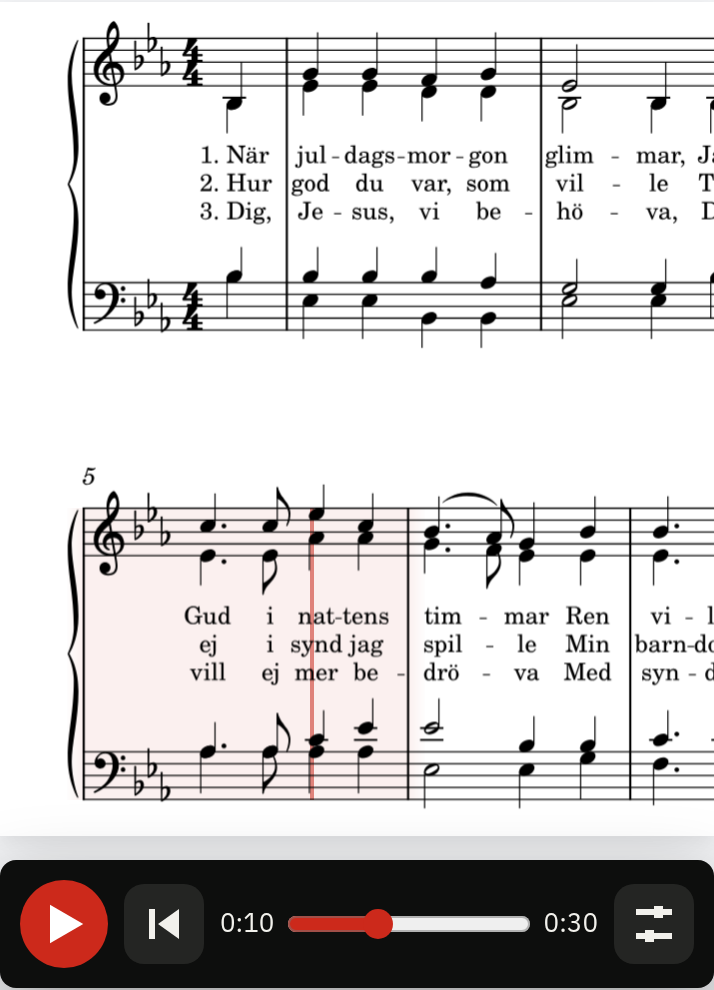
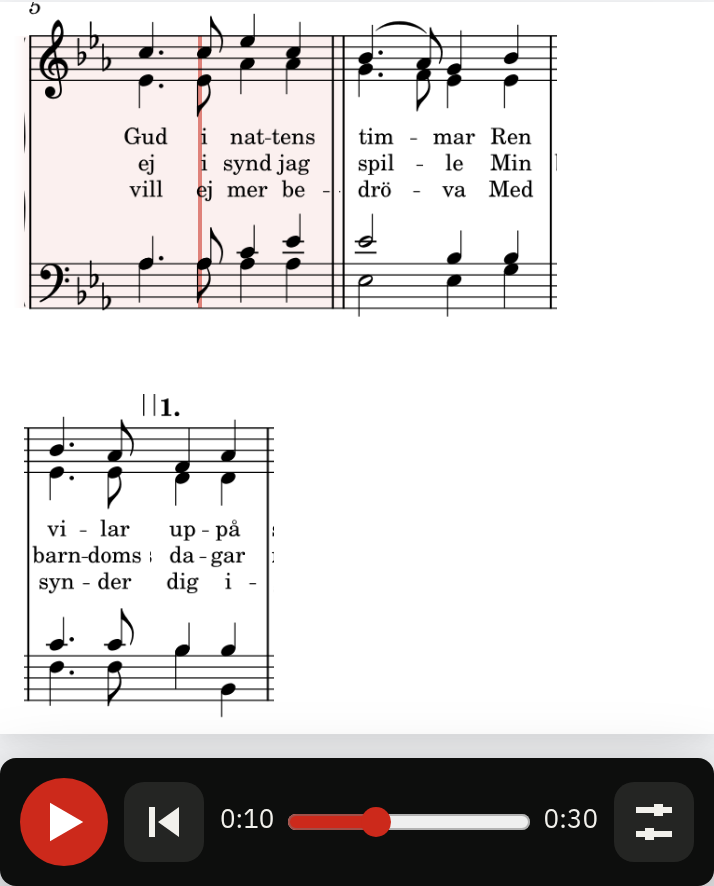
Reflow - It's not entirely honest to call this mode reflow. What it really does is that it, in a somewhat primitive way, chunks up the score bar by bar and lays the pieces out on the screen. It allows more subsequent bars to be shown at once than in "zoom" mode, but it may produce less visually pleasing layouts and more artifacts from the segmentation and cropping. You can see one in the screenshot below, where the volta bracket of the second line has been cut loose from its bars.
Full score is always the default, and it's also the fallback if the canvas modes fail for some reason. If you'd rather not decide yourself you can set mode="auto", which uses full score when the player is 768 px or wider and zoom below that.
How it works
When Segno Player is used to render and play files that have been exported from MuseScore, things are quite simple, since the MuseScore CLI supports exporting .spos and .mpos files. What are those, you may ask? Simply speaking they are compact XML files that specify the position of bars (.mpos) and notes (.spos) in the score. Thankfully for us they don't only specify the visual locations, they also contain timing information, which is what allows us to sync the exported MP3 with the playback.
One MuseScore conversion job writes everything the player needs from a single score: the audio, one SVG per page and the two position files.
echo '[{"in": "song.mscz", "out": ["song.mp3", "song.svg", "song.mpos", "song.spos"]}]' > job.json
mscore -j job.json
This is what the start of an .mpos file looks like for the example score in the screenshots (När juldagsmorgon glimmar):
<elements>
  <element id="0" x="13464.5" y="26393.2" sx="16788.6" sy="24486.9" page="0"/>
  <element id="1" x="30253.1" y="26393.2" sx="19900.1" sy="24486.9" page="0"/>
  ...
</elements>
<events>
  <event elid="0" position="0"/>
  <event elid="1" position="522"/>
  <event elid="2" position="2609"/>
  ...
</events>
The elements are the bars: where each one is on the page (x, y) and how big it is (sx, sy). The events say when a bar starts playing, in milliseconds. So in this score bar 0 starts immediately (that's the pickup bar), bar 1 after 0.5 seconds and bar 2 after 2.6 seconds. Note that the events are listed in playback order, so a bar inside a repeat shows up more than once, and things like voltas, D.S. and codas are already unrolled for us. I was pleasantly surprised by that, as it removes a whole category of annoying problems. The .spos file looks the same but with one element per note position instead of per bar, which is what drives the note cursor.
Segno turns these into what I call a sync map. It's a small JSON file (about 2 KB for a song) where all positions have been converted to fractions of the page, so the player doesn't need to care about the size of the SVG or the screen:
{
  "v": 1,
  "bars": [[0, 0.11309, 0.15675, 0.14102, 0.14543]],
  "events": [[0, 0], [1, 522]],
  "notes": [[0, 0.1901, 0.15675, 0.14543]],
  "noteEvents": [[0, 0], [1, 261]]
}
bars holds [page, x, y, w, h] for each bar and events holds [bar, ms] in playback order. The format is documented in the repo, and nothing says the sync map has to come from MuseScore. Anything that can produce bar positions and timings can write one, which turns out to matter in the next section. The sync map can be built in the browser, or ahead of time and shipped with the page.
The remaining parts are fairly straightforward. The pages are shown as plain SVG images, and the marker and cursor are drawn on top of them using the percentages from the sync map. During playback the player looks up which event is current for the audio's currentTime, and moves the marker accordingly. Clicking a bar goes the other way around: find the bar under the pointer and seek the audio to it (picking the pass through the repeat that's closest to where you currently are). The <segno-player> element follows the <audio> element API as closely as possible, so play(), pause(), currentTime, playbackRate and so on work as you'd expect.
<script type="module" src="https://cdn.jsdelivr.net/npm/@segnomusic/player/dist/player/index.js"></script>

<segno-player
  pages="song-1.svg song-2.svg"
  audio="song.mp3"
  positions="song.mpos"
  notes="song.spos"
  alt="När juldagsmorgon glimmar"
  controls
  follow>
</segno-player>
If the markers feel slightly early or late on your setup, you can tweak the timing with the bar-lead and note-lead attributes.
Beyond MuseScore files
Most of the scores I care about don't exist as MuseScore files though. They're scans or photos of old printed pages. I'm working on an OMR (optical music recognition) project of my own that reads a scan and turns it into MusicXML, with the aim of needing as little manual work as possible. It's not public yet, so I won't go into the details here.
What's relevant for Segno is that the sync map doesn't care where it came from. The MusicXML can be run through MuseScore to get audio and timings, and since the OMR knows where the bars are on the scan, the two can be matched bar by bar into a sync map. That means Segno can play along over the original scan instead of a fresh engraving.
To show that it isn't just something that works on clean scans, here's a real example. It's a photo of a page in an old hymnal, with all the usual issues: curved paper, uneven lighting and a shadow along the spine.
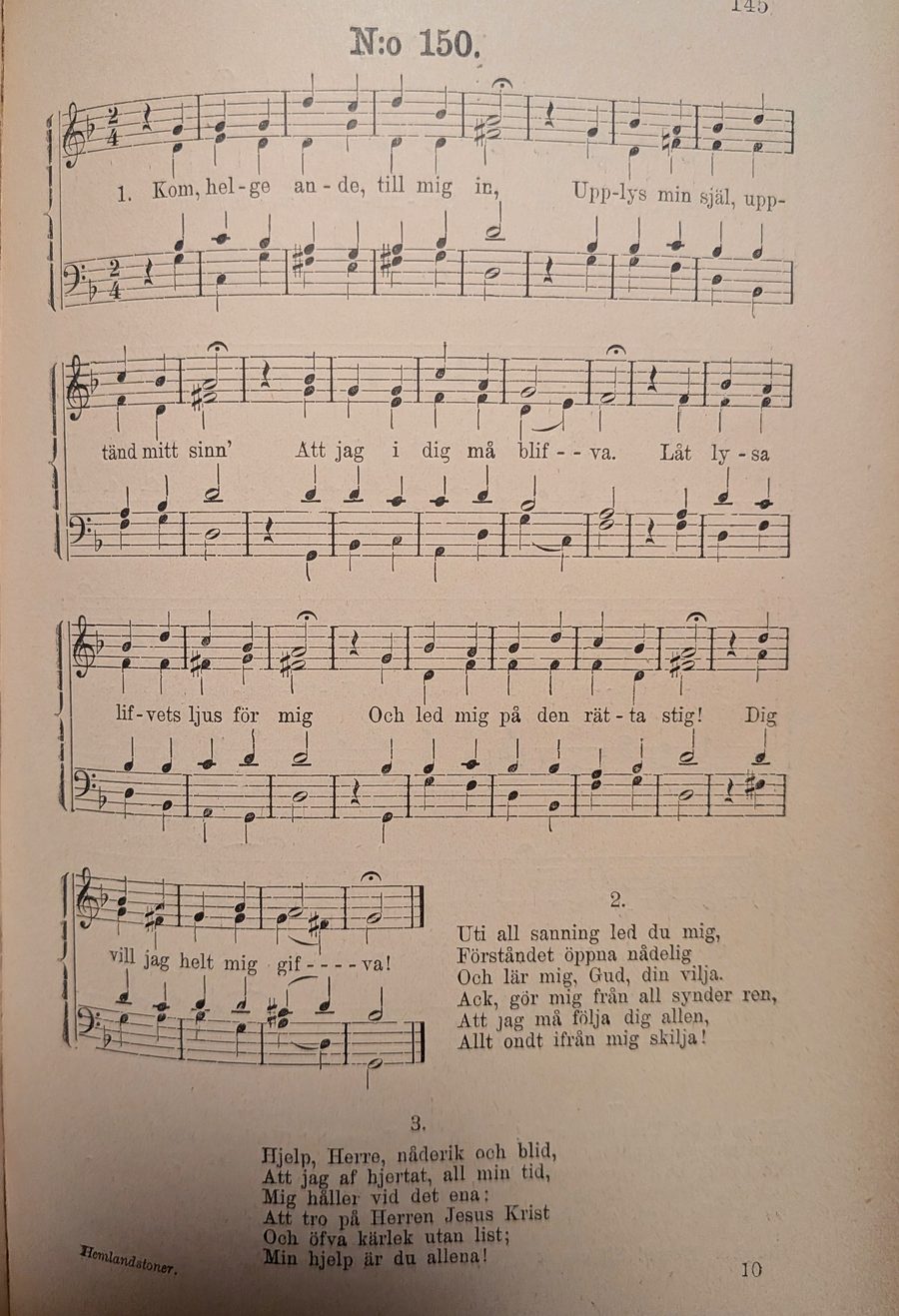
And this is the same page after going through the whole chain, playing in Segno Player (ten seconds, with sound). The page has been straightened out, and the bar marker follows the audio that was generated from the recognized music:
This isn't something you can try out yet. It's still a spike, and it's only as good as the recognition. But support for this is coming, and the plan is to end up with an end-to-end solution: scan in, player-ready sync map out.
Already in use
Segno Player is already running on frianoter.se, but it's not enabled for all songs. It only kicks in for songs that have been engraved in MuseScore and exported with audio and position files, which at the time of writing is 23 of the 63 songs on the site. For all the others, pressing "Lyssna" falls back to the old OSMD-based playback, which re-renders and synthesizes the score. That's the reflowing behaviour described above.
Here's one where it is enabled, the same score as in the screenshots above: När juldagsmorgon glimmar. Press "Lyssna" and you'll get the player. The site is built with Astro and Svelte, and the player just drops in as a web component.
Try it out
Segno Player is still pre-v1, in practice meaning there may be breaking changes to the API surface of both its web component, the sync map format and so on. It's quite unlikely that they change in ways that make it hard to migrate to future versions though, so if you find the player valuable already now, don't hesitate to try it out. There's a demo page where you can play around with the example score.
The minimal setup is to export your score from MuseScore:
echo '[{"in": "song.mscz", "out": ["song.mp3", "song.svg", "song.mpos"]}]' > job.json
mscore -j job.json(mscore is MuseScore's executable, and its name and path depend on your platform and install.) That gives you song.mp3, song-1.svg (one per page) and song.mpos. Then drop the player on a page:
<script type="module" src="https://cdn.jsdelivr.net/npm/@segnomusic/player/dist/player/index.js"></script>

<segno-player
  pages="song-1.svg"
  audio="song.mp3"
  positions="song.mpos"
  alt="My song"
  controls>
</segno-player>
That's it. Add a song.spos file and a notes="song.spos" attribute if you want the note cursor too. If you're using a bundler, npm install @segnomusic/player and import '@segnomusic/player' does the same job as the script tag. A couple of things are worth knowing: export everything in the same job from the same MuseScore version, and make sure "Play repeats" is on, otherwise the audio and the position files won't line up. The README covers those details and a few more.
And please open an issue in the GitHub repo if you run into problems or would like to submit a feature request.